
The other day, David made a good case in favor of continuing to use Filofax, rather than switching to an all-electronic setup. I'm not going to challenge his aesthetic choices -- hard to beat the leathery smell of a high-end Filofax or the sweep of a Mont Blanc over good paper -- but I am going to stick up for digital on some of the functional issues he raised.
So, with at least a nod to using objective criteria, here's the smackdown :
The Contenders:
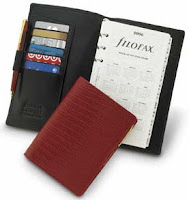
In this corner...Wearing leather shorts and looking strong for its advanced age, stands the venerable, world-class Filofax.
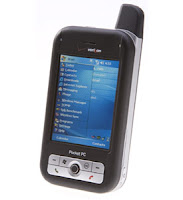
Our challenger…In the plastic body suit and the see-through screen protector, the powerful Windows Mobile phone.
Round One: Fast Note-Taking• Filofax: Grab a pen, flip it open, find a blank page, begin writing. (4 steps)
• Windows Mobile: Press pre-set button that opens note, begin writing. (2 steps -- 3 if you use a stylus)
Winner: Windows Mobile
Round Two: Losing Data• Filofax: Lose the Filofax, you've lost everything.
• Windows Mobile: Data syncs to server and other computers as soon as you enter it, where it's also backed up.
Winner: Windows Mobile
Round Three: Resource availability (how long can you keep using without "refreshing")
• Filofax: You're OK until a pen runs dry or you run out of blank/pre-printed pages (which, I might add are quite a bit more expensive than regular paper) (8 points)
• Windows Mobile: You can go as long as your batteries run and memory holds out. (In my case, with 8 GB of memory and two tiny backup batteries that keep me running for almost 36 hours of straight use, that's a long time)
Winner:Windows Mobile , since I'd rather carry two batteries (less than 2 ounces) than a pile of paper or extra pens.
Round Four: Weather resistance• Filofax: Use it in the rain and the pages warp and curl, the ink runs, the leather is ruined, and the whole thing is a soggy mess. Forever.
• Windows Mobile: Throw it is a clear plastic sleeve (I use Aquapac) and you can use the it in torrential ran -- and even under shallow water -- with no problem. (Note I said USE, not just store.) And, like an old-fashioned space pen, you can write at any angle.
Winner:Windows Mobile
Round Five: Data backup/archiving• Filofax: Take sheets out of the Filofax and scan them if you want to save them. Trim and clean up the scans, tag, and file. Data is not searchable, nor can it be retrieved remotely by the Filofax.
• Windows Mobile: All data saves and archives along with Outlook (or whatever) data. Handwritten notes can be converted to text and are searchable. Archives are accessible through wireless connections to desktop or by storing on card at all times.
Winner: Windows Mobile
Round Six: Reviewing notes
• Filofax: Using David's example, he reviews notes nightly and on weekends, and transfers what he wants to his laptop.
• Windows Mobile: Notes and data are reviewable on Windows Mobile, computer, or laptop at all times, no need for transfer or any extra steps or effort. (If you must review them on paper, you can always print them out.)
Winner: Windows Mobile
Round Seven: Theft or loss risk• Filofax: As Charles Grodin learned, even the reward leaf won't get your Filofax back or protect the data you have in it.
• Windows Mobile: Device (and storage card) are password protected, sensitive data is encrypted, plus I can do a remote wipe of the entire through from the web.
Winner: Windows Mobile
Round Eight: Versatility• Filofax: David mentioned he has his Filofax, an iPhone, a MacBook Pro, and a notebook for longer writings. Even just as a single tool, a well-stuffed Filofax can add a few pounds.
•Windows Mobile: I carry one 6-ounce device that gives me:
1. Phone
2. Email (via hosted exchange)
3. Texting
4. Instant messaging (via AIM)
5. Calendar
6. Addresses
7. To-do (next action) list
8. Notebook (in longhand or typing)
9. Handwriting available (via Notes or various programs)
10. Typing (via thumb keyboard or foldout Stowaway)
11. Voice recorder
12. Camera
13. Video Recorder
14. Pen (inside stylus)
15. Calculator
16. Modem for other devices to get online (via ICS)
17. MS Word
18. MS Excel
19. MS OneNote (OK, but limited)
20. MS PowerPoint viewer (admittedly, it sucks)
21. MS Money (through Spb Finance)
22. MS Internet Explorer (please Mozilla, hear my cries…)
23. Adobe Reader
24. Adobe Photoshop Express
25. Alarm clock (Spb Time)
26. Timer (Spb Time and limited built-in)
27. Remote control (via Novii)
28. Music player (MP3, WMA, etc.)
29. Video player (I keep 5 full-length features on my SD card)
30. Tivo and live TV streaming (via Slingplayer and/or Spb Online)
31. Radio (direct via IE or through Spb Online)
32. Instant news/weather (IE, RSS feeds, and email alerts)
33. Newspapers (usually Google Reader, full-text Spb Insight)
34. Magazines (same as above)
35. Books (eReader or Mobipocket)
36. Remote desktop access (via LogMeIn)
 Winner:
 Windows Mobile
. And, with that, I'm going to declare a
TKO.
Despite this, I want to say again what a great thing Filofaxes are, and add that "I use them because I just like them better" is a perfectly good reason to use them.
But, when people bring up some of the points David (and many others!) have raised, I think they're not assessing Windows Mobile's capabilities and affordances accurately. In my view, there are very few issues where a Filofax outshines a Windows Mobile, even as a notetaker.
So, David, thanks for raising the issues that prompted the Smackdown! I appreciate your feedback!




 Posts
Posts

